Discovering the ‘aHA’ moment and improving 30day retention by 10pts
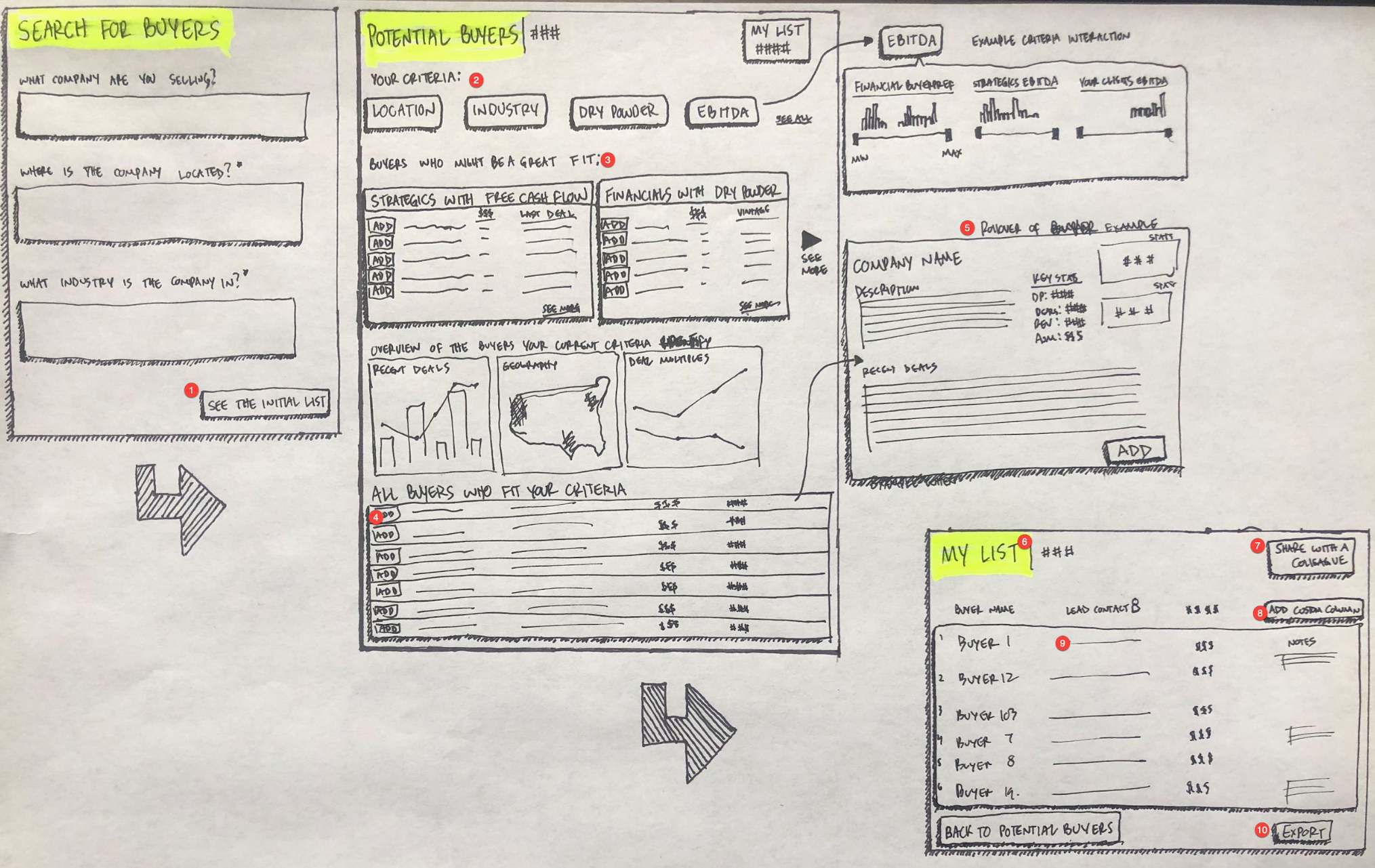
Early concept sketch i did for Guided Buyers List
View the Original Customer Insights Presentation Here
A messy, high-stakes workflow
When I joined PitchBook, one of the first projects handed to me was something called Guided Buyers List.
On the surface, the idea was straightforward: help our customers—mostly investment banks, PE firms, and corporate deal teams—build a list of potential acquirers for a company they’re trying to sell. In practice, this is one of the most consequential and anxiety-inducing workflows in M&A. If you miss the right buyer, you don’t just lose theoretical upside; you can tank a process and damage a relationship.
PitchBook already had a powerful Investors & Buyers search. You could slice investors and strategics by industry, geography, deal size, fund size, preferences, and more. The problem was the experience:
It was easy to over-filter or create double negatives.
Users would end up with tiny or empty result sets and assume they were doing it wrong.
Customer success spent 20–30 minutes on calls building searches and buyers lists for customers, then saving them and setting alerts.
Guided Buyers List was pitched to me as “a feature we should ship.” I reframed it as a bigger question:
How do we turn a complex, expert, relationship-driven workflow into a guided, self-serve product experience—without dumbing it down for people whose careers depend on getting it right?
Going into the field: how buyers lists are actually built
Before writing a single requirement, I went and sat with the people doing the work.
I spent time with:
Sell-side investment banks (both boutique and bulge-bracket) who live inside buyers lists.
PE and VC firms looking to exit portfolio companies.
Corporate teams occasionally selling a division or technology line.
I interviewed them, shadowed them over days and weeks, listened to Gong recordings, and watched analysts build lists in real time.
A few patterns showed up everywhere:
They start with their network. PitchBook is not the origin of the list; it’s where they expand and validate it. Coffee meetings, conferences, and previous deals are the seed universe; the software is a force multiplier.
They invest heavily in context. Four-hour kickoff meetings, plant tours, hours of reading industry news—this is how they build conviction about “who might buy this.”
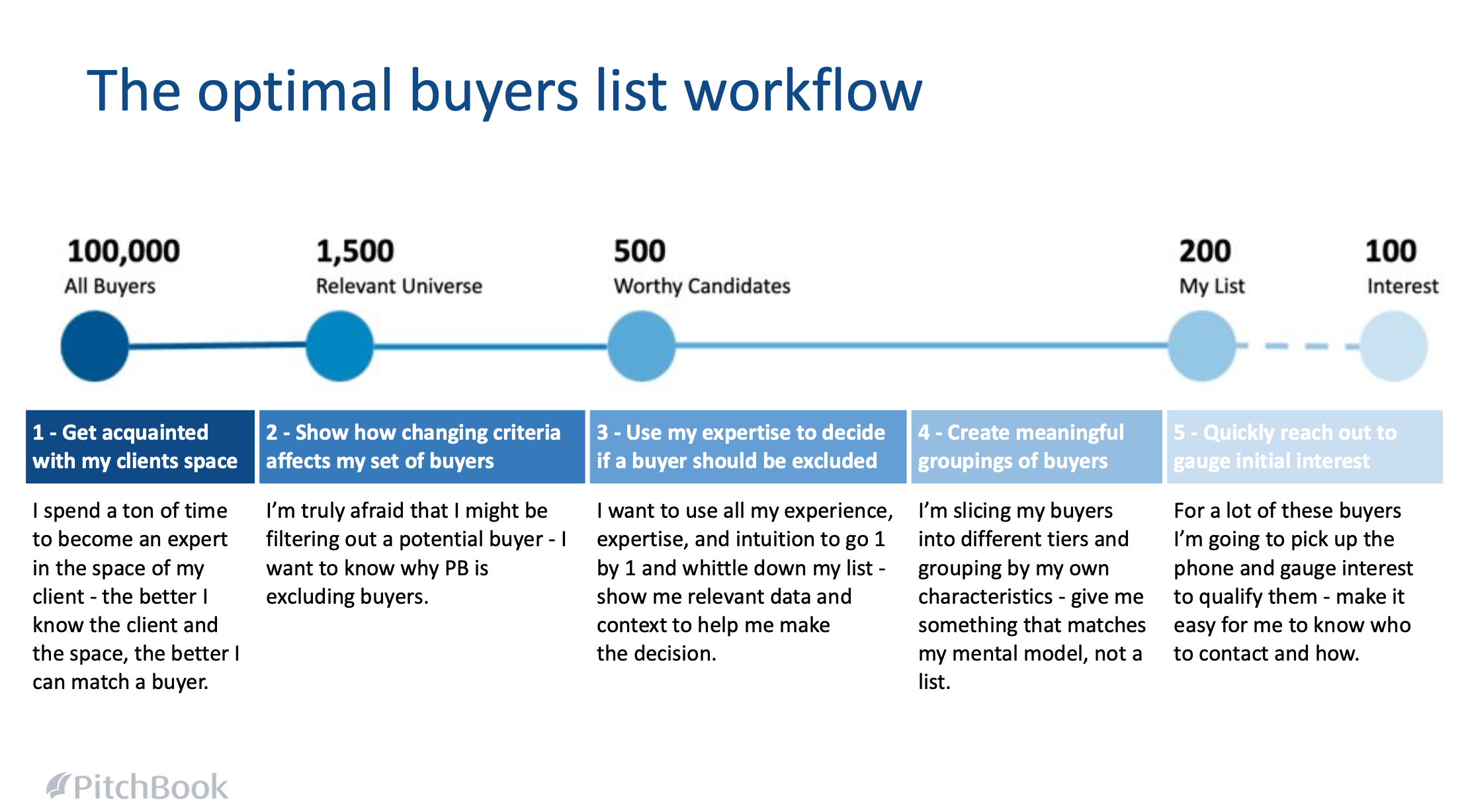
They want a wide net, then a funnel. People would rather have 200 plausible buyers to vet than 20 they’re not sure about. “If you don’t buy a ticket, you can’t win the lottery” was a pretty common sentiment.
Judgment is the job. Nobody wanted PitchBook to magically spit out “the top 10 buyers.” What they wanted was a credible universe plus enough context to make their own calls.
They think in tiers and groups, not a flat list. Tier 1/2/3, strategics vs financial, “stretch” buyers, “likely but annoying to work with,” etc. The mental model is a set of buckets, not a single ranked table.
Excel and decks are still the default workspace. Even the heaviest PitchBook users were exporting results to Excel, building scorecards and tiers there, and then pasting into PowerPoint for clients.
We eventually turned this into a more structured research artifact (mindset insights, top problems, ideal workflow), but the core realization was simple:
The product shouldn’t replace the expert. It should make it easier to see the whole landscape and apply judgment quickly and defensibly.
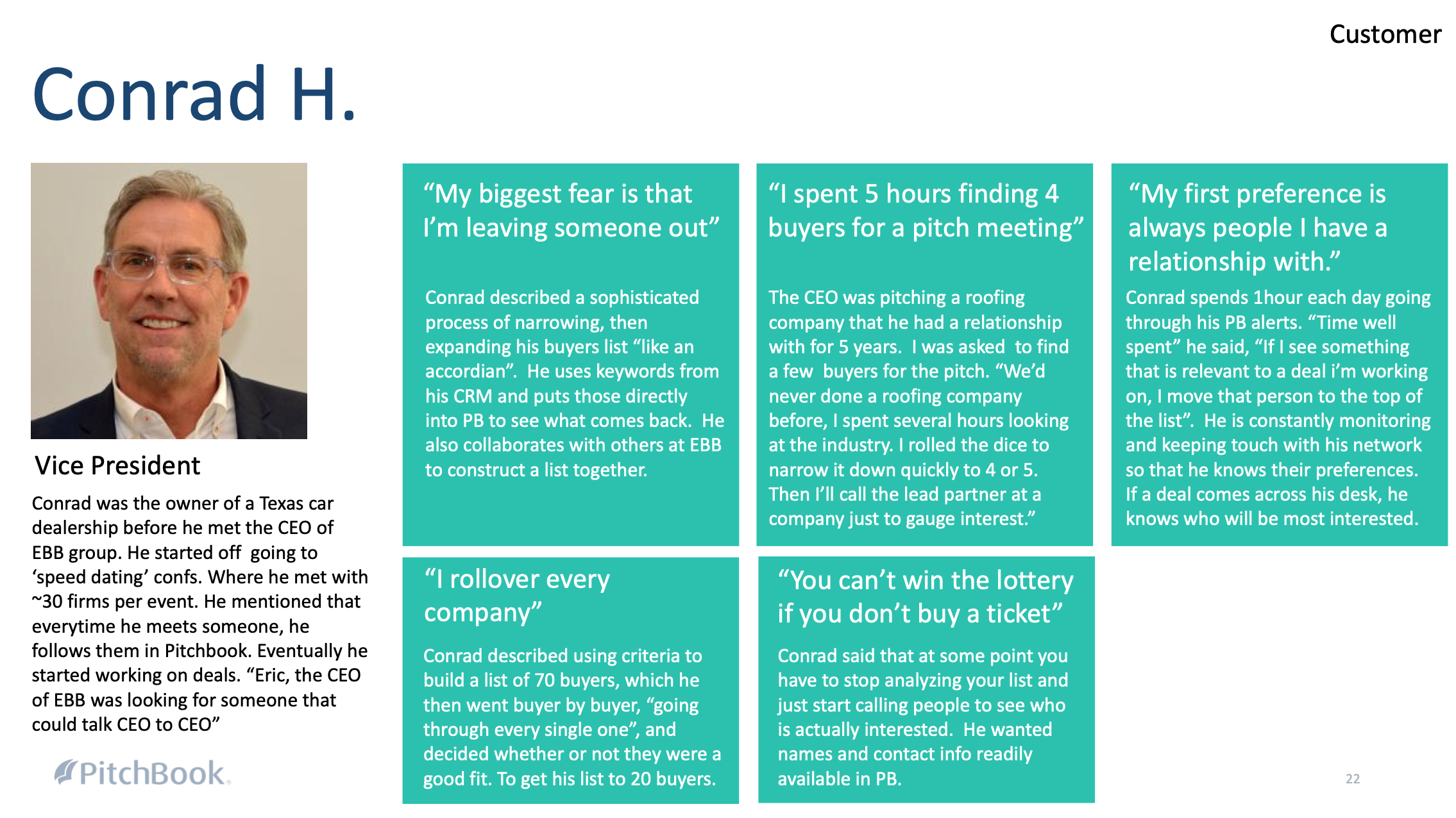
A customer profile from someone I talked and shadowed in the primary research phase
Design principles: guided, opinionated, but never opaque
From that research, I set a few design principles for Guided Buyers List:
Start simple, then deepen. Seed the system with a small number of high-signal inputs about the company you’re selling (industry, location, size), not a wall of twenty filters.
Guided, not auto-pilot. Use our data to suggest smart “slices” of buyers, but always keep the logic legible and let the human decide who makes the cut.
Mirror the real funnel. The experience should look like the actual process: cast a wide net → explore different hypotheses → whittle down → tier and group.
One workspace for the whole job. Searching, evaluating, grouping, and editing the list should all happen in one place. You should never feel like you’ve lost the thread of “what is my current list?”
Respect expert time. Every buyer row should be a “five-minute decision”: enough context in one place to quickly say “yes, no, or ‘maybe, Tier 2.’”
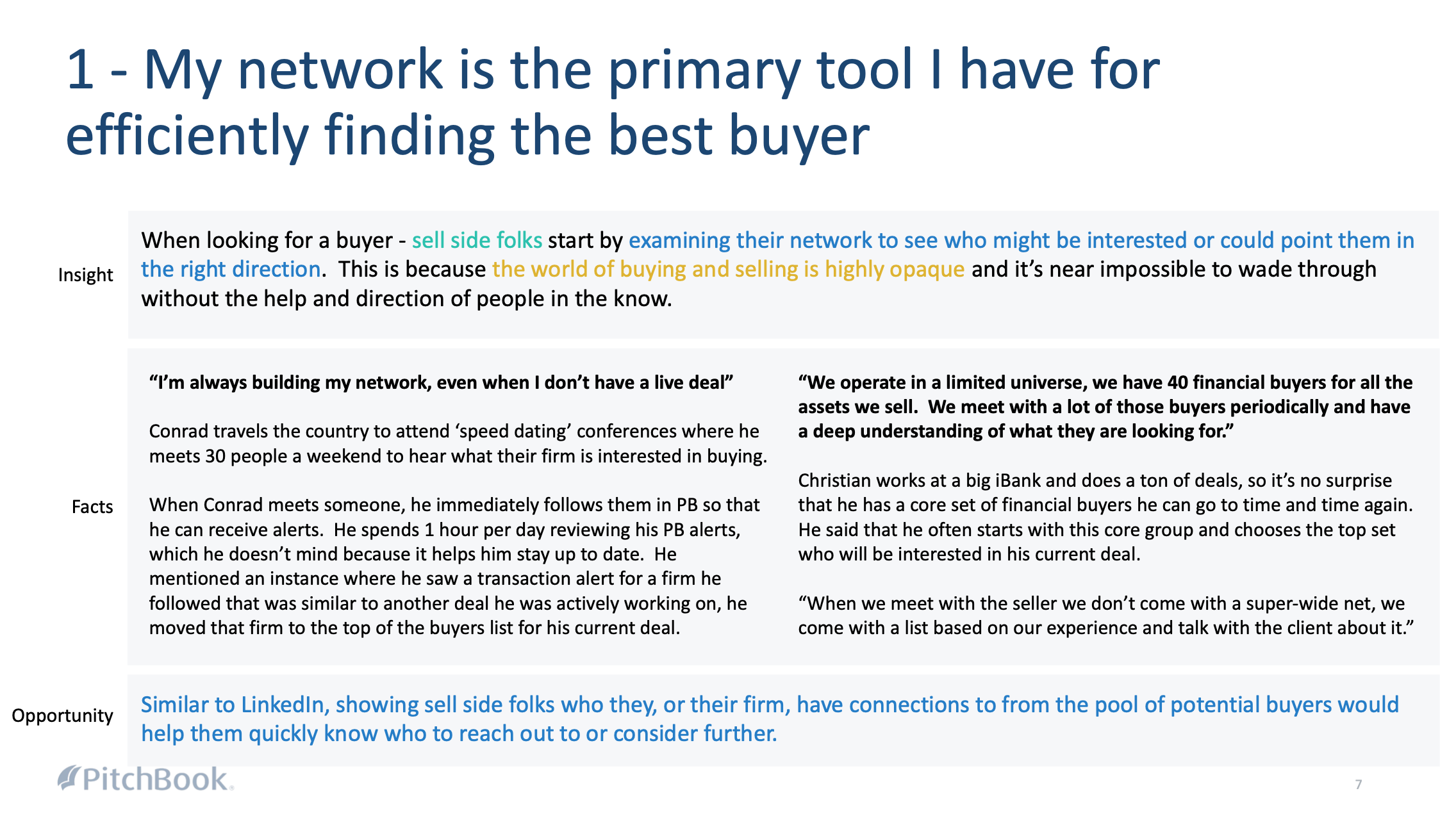
1 of 7 key insights that informed the design principles of GBL
The experience: from raw search to a guided buyers workspace
We turned those principles into an end-to-end workflow that sits on top of PitchBook’s raw search capabilities.
Seed the universe with minimal inputs
Instead of dumping people into a blank advanced search UI, we start with the company being sold:
Where is it headquartered?
What industry/vertical is it in?
What rough deal size range are we talking about?
Behind the scenes, we run multiple overlapping searches across strategics and investors—people who have done relevant deals, expressed preferences in that space, or have capital and mandate to play there—and merge them into a “relevant universe” of potential buyers.
Spotlights: guided hypotheses instead of fiddly filters
From the research, it was clear bankers think in hypotheses:
“Strategics that have been acquisitive in this vertical recently.”
“PE-backed platforms doing add-ons in this size range.”
“Regional players who fit but haven’t acquired yet.”
We turned those into Spotlights: pre-packaged slices of the universe that bundle multiple filters into one click. Things like:
“Highly acquisitive strategics with capacity.”
“PE-backed acquirers in this space.”
“High-multiple buyers in the last 24 months.”
“In your network” (buyers connected to people you already know).
Instead of hunting through 20 fields, you click a card that matches how you already think about the problem. Under the hood, it’s still just search—but it feels more like “did you consider this group?” than “good luck, here’s a form.”
“My List”: a real working canvas, not just a table
Once you’ve explored a few spotlights and tuned the universe, you start making decisions:
Add buyers to My List.
Drag them into custom groups (Tier 1/2/3, strategic vs financial, stretch, etc.).
Annotate them with quick notes or rationale.
We built My List as a persistent workspace, not a one-off result. Junior analysts, MDs, and clients all end up talking about this list, in this structure. It’s closer to what people were already doing in Excel and PowerPoint, just moved back into PitchBook where the data is live and can be refreshed.
Deep context in one place
To support those five-minute decisions, each buyer row pulls in the context you actually need:
Recent deals and deal sizes in the relevant space.
Fund size / balance sheet, so you know they can afford the deal.
Stated investment preferences.
The best initial contact to call or email.
Instead of bouncing between company profiles, fund pages, and deal lists, you can scan, decide, and move on.
Under the hood: a buyer-matching engine that earns trust
In parallel with the UX, I built a proprietary buyer-matching algorithm with our data and engineering teams.
The job of the algorithm wasn’t to say “here are the top 10 buyers, trust us.” Its job was to have a strong, data-backed opinion about where to start.
We:
Combined multiple underlying searches (strategics with deals in similar companies, investors with relevant preferences, buyers active in the right size band and region).
Weighted recency, similarity, financial capacity, and a few other firm-level signals.
Backtested against known deals: given a historical sell-side process, did the eventual buyer show up in the recommended candidate set?
After iterating, we got to a place where ~80% of historical acquirers appeared in the recommended list for their deals.
For sophisticated users, that felt like the right balance:
Strong enough to trust that “PitchBook knows the neighborhood.”
Still leaving room for human judgment, back-channel knowledge, and the realities of deal politics.
Impact: more confidence, less thrash, better stories
We didn’t position Guided Buyers List as a magical AI that would do the work for you. We pitched it honestly:
“A guided workspace that helps you cast a wider net, avoid blind spots, and build a stronger, more defensible buyers list—without leaving PitchBook.”
The impact showed up across a few dimensions:
Quality of work: Analysts had a structured way to explore hypotheses and justify why certain buyers were on (or off) the list.
Time & thrash: Instead of burning time wrestling with the advanced search UI and exporting everything to Excel, more of the process stayed inside PitchBook.
Customer success leverage: CS reps adopted Guided Buyers List as their default way of teaching people “how to think” about buyers, rather than manually building bespoke searches each time.
Sales narrative: It became a showpiece feature—proof that PitchBook wasn’t just a big database, but a product that understood how deal teams actually work.
And it set up the second half of the story: if this is how people really get value from PitchBook, why isn’t our onboarding built around it?
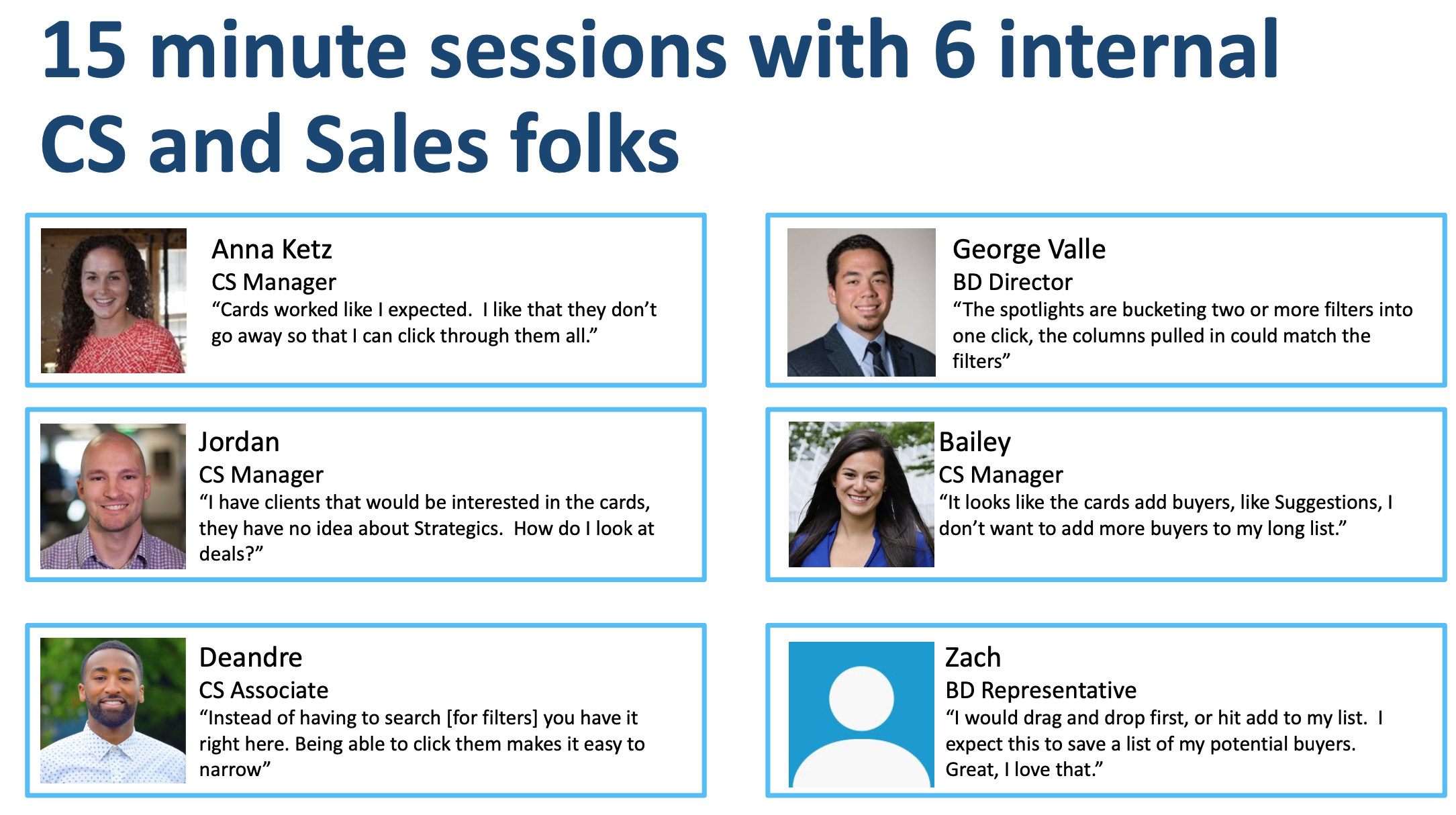
profiles of internal pitchbook employees in customer success where we uncovered the ‘aha’ moment for pitchbook was happening ad hoc
Redesigning onboarding around the “three searches and one alert” moment
While we were building Guided Buyers List, I kept seeing a different pattern: how people first experience PitchBook.
Ask most customers why they bought the product and you get some variant of:
“I want to ask a very specific question and get a list back immediately.”
For example: “Show me all biotech companies in the Pacific Northwest that did a $5–20M deal in the last two years.” The second half of the magic is: “Now save that search and alert me when new companies match.”
That’s the real aha moment: complex question → crisp answer → continuous monitoring.
The problem was how we got people there:
Advanced search was powerful, but intimidating and easy to misconfigure.
Saved searches and alerts were tucked away like power-user features.
New users were paired with a trainer who, in practice, spent 20–30 minutes building searches and alerts on their behalf.
Around this time I was doing Reforge’s Activation & Retention course, which pushes you to define your aha moment in behavioral terms and then measure it.
So I went to the data.
I cohorted new users by their first-week behavior:
How many advanced searches they ran in their first few logins.
Whether they saved any searches.
Whether they turned on alerts for those searches.
The pattern was clean:
Users who ran at least three advanced searches in week one
And saved at least one of them with alerts enabled
…had the highest long-term active use by a meaningful margin.
At that point, onboarding had a new job description:
Onboarding is successful if a new user runs three meaningful advanced searches and sets an alert on one of them. Everything else is nice-to-have.
Wrapping advanced search instead of rebuilding it
Rewriting the advanced search UI from scratch would have been a multi-quarter lift. We didn’t have that runway, so we did something narrower and more pragmatic: wrap the existing power in a guided flow aimed specifically at that aha moment.
The new experience looked like this:
Template starter searches. We created a set of canned, high-value searches (“recent deals in your coverage area,” “potential acquirers like this company,” etc.) that exposed a simplified filter set instead of the full matrix.
Guardrails instead of silent failure. We added inline hints and warnings for over-filtering and contradictory logic, plus helpful empty states, so users weren’t left with “0 results” and no idea why.
“Save & alert me” as a first-class step. Once you ran a search and saw a satisfying result set, the primary call-to-action was “Save this search and turn on alerts,” not just “Done.” It nudged people into treating PitchBook as an always-on radar, not a one-off lookup tool.
A soft off-ramp to human help. If you still felt stuck, you could describe what you were trying to find or schedule a call. Customer success didn’t go away; they just became the backup path, not the only path.
We shipped the flow, then watched what happened to new cohorts.
For users who went through this new onboarding, we saw roughly a 10-percentage-point lift in 30-day active use, and those usage curves stayed elevated over time. It also reduced the volume of “please build this search for me” calls, which meant CSMs could focus more on strategic guidance and less on driving the UI.
Taken together, Guided Buyers List and the advanced search onboarding reframe came from the same pattern of work:
Go deep enough with customers to understand how they actually think and work.
Use data to define the behaviors that truly matter.
Then design guided, opinionated experiences that pull more people into those behaviors—without pretending the product can replace expert judgment.
It’s the same playbook I use anywhere there’s a deep data set and a complex workflow: make the expertise legible, make the product genuinely helpful, and keep the human firmly in charge.